What is a Network? Check Out the Functions and Examples

What is a Network? Check Out the Functions and Examples
In the modern world, the term “network” is ubiquitous. It is a foundational concept that underpins much of the technology and communication infrastructure we rely on daily. But what exactly is a network? What functions does it serve, and how is it applied in different contexts? This article delves into these questions, providing a comprehensive overview of networks, their roles, and examples to illustrate their importance.

What is a Network?

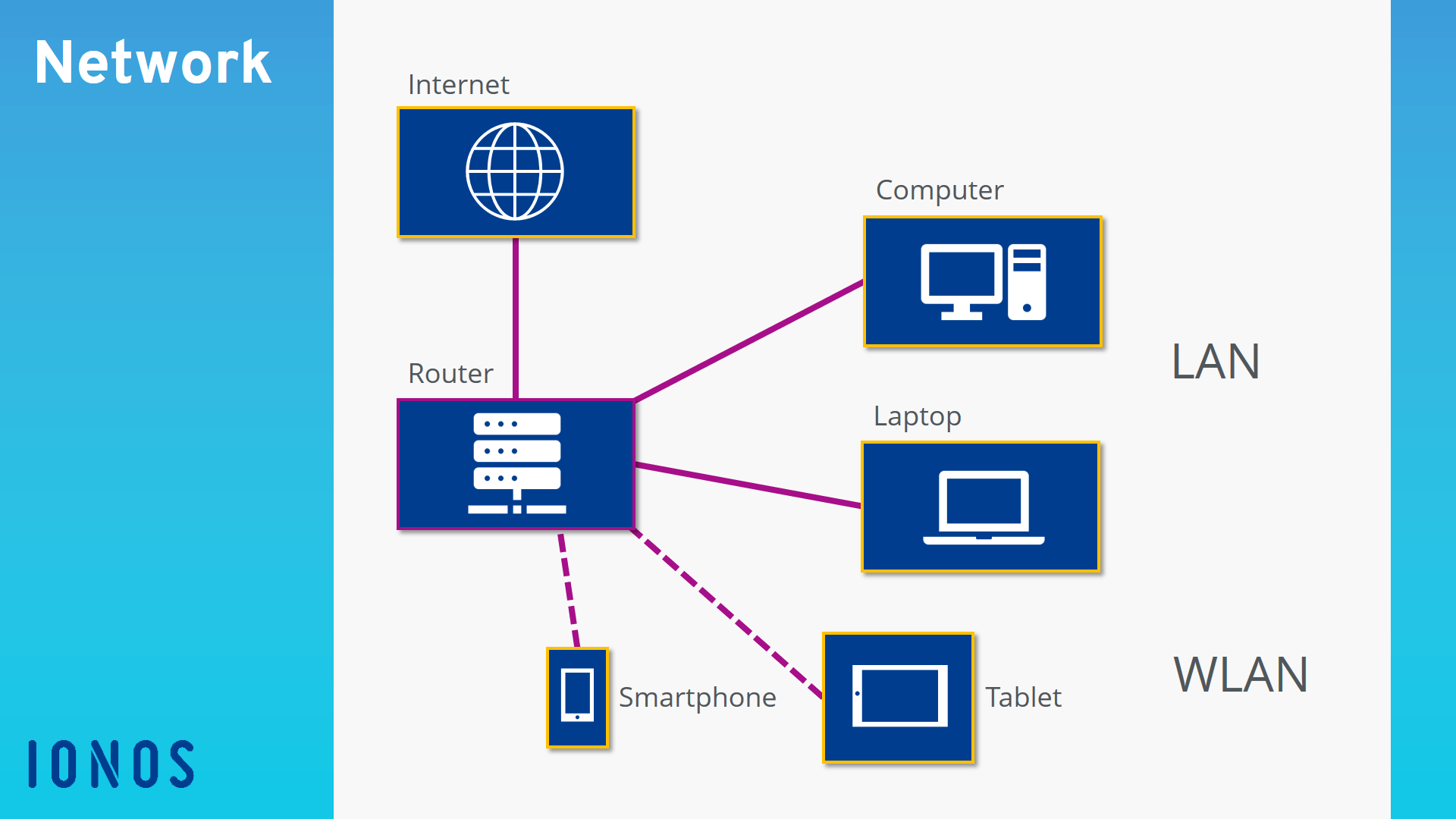
A network, at its core, is a system of interconnected entities designed to share resources and information. These entities can range from computers and servers to people and organizations. Networks enable communication, collaboration, and the efficient distribution of data across connected points. Depending on their design and purpose, networks can vary significantly in size, complexity, and application.

In the context of technology, a typically refers to a group of devices connected to one another to share data or resources. These devices could include computers, printers, smartphones, and servers. It can be as small as a home setup or as vast as the internet, which is the largest network in existence.

Types of Networks

Networks can be categorized based on their size, purpose, and architecture. Below are the most common types:

  1. Local Area Network (LAN): A LAN is a network confined to a small geographic area, such as a home, office, or school. It is commonly used to connect computers and devices within the same building for resource sharing and communication.
  2. Wide Area Network (WAN): A WAN covers a larger geographic area, often spanning cities, countries, or even continents. The internet is the best-known example of a WAN.
  3. Wireless Network (Wi-Fi): Wireless networks allow devices to connect without physical cables using radio waves. Wi-Fi is a common example, widely used in homes, businesses, and public spaces.
  4. Metropolitan Area Network (MAN): A MAN covers a city or a large campus and is larger than a LAN but smaller than a WAN. It often connects multiple LANs within its range.
  5. Personal Area Network (PAN): A PAN connects devices over a short range, typically around an individual. Examples include Bluetooth connections between a smartphone and a wireless headset.
  6. Virtual Private Network (VPN): A VPN extends a private network across a public one, enabling secure communication. It is commonly used for privacy and security when accessing the internet.

Functions of a Network

Networks play a crucial role in the modern world, providing several key functions that enhance efficiency, connectivity, and communication. Here are the primary functions of a network:

  1. Resource Sharing: Networks enable multiple devices to share resources such as printers, storage, and internet connections. This reduces costs and improves efficiency.
  2. Data Sharing and Communication: Networks facilitate the exchange of information between devices and users. Emails, video conferencing, and instant messaging are examples of communication enabled by networks.
  3. Centralized Management: In organizations, networks allow centralized management of resources, data, and user accounts. This simplifies administration and enhances security.
  4. Remote Access: Networks enable users to access resources and data from remote locations. Cloud services are a prime example of this function.
  5. Scalability: Networks can be expanded to accommodate additional devices and users, making them adaptable to growth.
  6. Collaboration: Teams can collaborate in real time, sharing documents, data, and ideas seamlessly through networked systems.

Examples of Networks in Everyday Life

  1. Home Networks: A home network connects devices like computers, smartphones, smart TVs, and IoT devices to the internet. It enables activities such as streaming, gaming, and remote work.
  2. Corporate Networks: Businesses use networks to connect employees, share resources, and manage operations. Tools like email servers, CRM software, and file-sharing platforms rely on robust network.
  3. Social Networks: While not a technical network in the traditional sense, social networks like Facebook and LinkedIn connect individuals globally, enabling information sharing and communication.
  4. Educational Networks: Schools and universities use networks to provide students and staff with access to learning materials, administrative tools, and collaborative platforms.
  5. Public Wi-Fi Networks: Found in cafes, airports, and hotels, public Wi-Fi networks allow users to connect to the internet in shared spaces.
  6. Healthcare Networks: Hospitals and clinics use networks to manage patient records, enable telemedicine, and connect medical devices.
  7. The Internet: The internet is a vast network of networks, connecting billions of devices worldwide. It serves as the backbone for communication, commerce, entertainment, and more.

Components of a Network

To understand how networks operate, it’s essential to know their core components:

  1. Hardware:
    • Routers: Direct data traffic between devices and networks.
    • Switches: Connect multiple devices within a LAN.
    • Modems: Enable internet connectivity by converting digital signals to analog and vice versa.
    • Servers: Store and manage resources for other devices.
  2. Software:
    • Operating systems and applications that facilitate communication and resource management.
  3. Protocols:
    • Rules that govern how data is transmitted across a network. Examples include TCP/IP and HTTP.
  4. Cabling and Wireless Media:
    • Physical cables (e.g., Ethernet) or wireless technologies (e.g., Wi-Fi) that connect devices.

The Future of Networks

The evolution of networks continues to transform the way we live and work. Emerging technologies like 5G, the Internet of Things (IoT), and edge computing are expanding the possibilities of networking. These advancements promise faster speeds, lower latency, and more connected devices, paving the way for smart cities, autonomous vehicles, and enhanced virtual experiences.

Conclusion

A network is much more than a system of connected devices; it is the backbone of modern communication, collaboration, and resource sharing. By understanding the types, functions, and examples of networks, we can appreciate their pivotal role in shaping our digital and interconnected world. Whether at home, in the workplace, or across global infrastructures, networks continue to enable the seamless exchange of information and resources, driving innovation and progress.


Data at Risk: The Dangerous Afterlife of Your Discarded Technology

Data at Risk: The Dangerous Afterlife of Your Discarded Technology

When a major financial institution in Singapore completed its digital transformation last year, hundreds of devices containing sensitive customer information were marked for IT asset disposal. What happened next reveals a shocking vulnerability that security experts have been warning about for years—but few organisations have properly addressed. The decommissioned equipment, still containing recoverable data despite cursory wiping attempts, disappeared into a shadowy secondary market where digital forensics experts can extract seemingly deleted information with alarming ease.

The Hidden Threat

In an unmarked industrial building just outside Singapore’s central business district, a security researcher demonstrates how easily data can be recovered from supposedly “cleaned” devices. With commercially available software and modest technical skills, he retrieves banking details, personal identity information, and corporate documents from second-hand hard drives purchased through online marketplaces.

“Most organisations dramatically underestimate how persistent digital data truly is,” explains the researcher, who consults for government agencies on cybersecurity vulnerabilities. “Standard deletion and even basic formatting don’t actually remove data—they just make it invisible to the casual user.”

Recent investigations reveal disturbing statistics:

  • 78% of second-hand storage devices contain recoverable data from previous owners
  • 63% contain personally identifiable information including names, addresses, and identification numbers
  • 26% contain login credentials and password information
  • 11% contain financial records including banking details

The Singapore Personal Data Protection Commission warns: “Organisations that fail to implement proper data disposal methods remain liable for any subsequent breaches, regardless of whether the equipment has physically left their possession.”

Regulatory Consequences

The regulatory landscape in Singapore has evolved to address this growing threat, imposing significant penalties on organisations that fail to properly sanitise decommissioned equipment:

  • Fines of up to S$1 million under the Personal Data Protection Act
  • Mandatory breach notification requirements
  • Potential criminal liability for directors and officers
  • Reputational damage that often exceeds direct financial penalties

“The most serious incidents we investigate often begin with improper disposal rather than active hacking,” notes a senior investigator with Singapore’s Cyber Security Agency. “Traditional security focuses on protecting active systems, but disposed assets represent a significant blind spot in many security programmes.”

The Anatomy of a Breach

In a recent case that sent shockwaves through Singapore’s business community, a multinational corporation discovered that internal strategic documents had appeared on a competitor’s desk. The subsequent investigation revealed an unexpected source: decommissioned laptops that had been improperly wiped before disposal.

The breach unfolded in several stages:

  • Inadequate Sanitisation: IT staff performed only basic formatting rather than secure wiping
  • Improper Disposal: Equipment was sold to a third-party vendor without verification of data destruction
  • Secondary Market: Devices entered the grey market for used electronics
  • Data Recovery: Sophisticated actors purchased the equipment specifically to extract valuable information
  • Exploitation: Recovered data was leveraged for competitive advantage

Best Practices for Secure Disposal

Security experts recommend a comprehensive approach to equipment decommissioning:

  • Inventory Management: Maintain detailed records of all data-bearing assets throughout their lifecycle
  • Secure Wiping: Employ certified data destruction methods that comply with standards such as NIST 800-88
  • Physical Destruction: For highly sensitive environments, consider physical destruction of storage media
  • Chain of Custody: Document the handling of assets from decommissioning through final disposition
  • Vendor Verification: Thoroughly validate the credentials and processes of any disposal partners

The Infocomm Media Development Authority of Singapore emphasises: “Organisations must implement a documented process for secure IT asset disposal that addresses both data security and environmental considerations.”

The Environmental Dimension

Proper disposal isn’t just about security—it’s also about environmental responsibility. Singapore generates approximately 60,000 tonnes of e-waste annually, containing hazardous materials that pose serious environmental and health risks if improperly handled.

Responsible disposal must balance security imperatives with environmental considerations:

  • Prioritising refurbishment and reuse where appropriate
  • Ensuring hazardous components are processed by licensed facilities
  • Recovering valuable materials through proper recycling channels
  • Complying with Singapore’s Resource Sustainability Act

The International Dimension

The problem extends far beyond Singapore’s borders, creating geopolitical vulnerabilities that security agencies are increasingly concerned about. Investigations have traced improperly disposed devices from Singapore-based organisations to locations across Southeast Asia, China, and Eastern Europe, where sophisticated actors employ advanced recovery techniques to extract valuable intelligence.

“What begins as negligent disposal in Singapore can end as an intelligence goldmine halfway across the world,” warns a former intelligence officer now working in private security. “We’ve tracked devices containing sensitive government contractor information to workshops operating with clear state sponsorship, where teams of technicians methodically harvest data for competitive or intelligence advantage.”

A Framework for Protection

Forward-thinking organisations approach disposal as a critical element of their broader security and compliance programmes. This integrated approach includes:

  • Clear policies governing the entire asset lifecycle
  • Regular staff training on disposal procedures
  • Periodic audits of disposal processes
  • Certificates of destruction for all decommissioned equipment
  • Contractual safeguards with disposal vendors

“The most common mistake we see is treating disposal as an afterthought,” explains a prominent Singapore data protection officer. “By the time sensitive information appears where it shouldn’t, it’s already too late to contain the damage.”

In an age of increasing regulatory scrutiny and sophisticated data recovery techniques, organisations must recognise that their responsibilities don’t end when equipment reaches the end of its useful life. The ghosts of data past can return to haunt those who fail to implement proper hard disk disposal.

Understanding What Are Gadgets? Types, Functions, and Examples

Understanding What Are Gadgets? Types, Functions, and Examples

In the modern world, gadgets have become indispensable tools that shape how we live, work, and play. From smartphones to smartwatches, gadgets serve as the backbone of our increasingly digital lives. But what exactly are gadgets, and how do they function? This comprehensive guide delves into the types, functions, and examples of gadgets, helping you better understand their role in our everyday routines.

What Are Gadgets?

A gadget is a small, innovative device or tool designed to simplify tasks, provide entertainment, or enhance productivity. Gadgets are typically electronic, though they can also include mechanical devices. Their primary appeal lies in their functionality and convenience, often introducing cutting-edge technology to solve everyday problems.

Types of Gadgets

Gadgets can be categorized into various types based on their purpose and application. Below are some of the most common categories:

1. Communication Gadgets

  • Examples: Smartphones, tablets, smartwatches.
  • Functions: Enable communication through calls, messages, emails, and video chats.

2. Entertainment Gadgets

  • Examples: Smart TVs, gaming consoles, headphones, VR headsets.
  • Functions: Provide audio-visual entertainment, gaming experiences, and immersive content.

3. Health and Fitness Gadgets

  • Examples: Fitness trackers, smart scales, heart rate monitors.
  • Functions: Track health metrics such as steps, calories burned, and sleep patterns to promote a healthier lifestyle.

4. Home Automation Gadgets

  • Examples: Smart thermostats, security cameras, robotic vacuum cleaners.
  • Functions: Automate household tasks, enhance security, and improve energy efficiency.

5. Productivity Gadgets

  • Examples: Laptops, tablets, wireless keyboards, and e-readers.
  • Functions: Boost efficiency in work, education, and personal organization.

6. Kitchen Gadgets

  • Examples: Instant pots, coffee machines, smart blenders.
  • Functions: Simplify cooking and food preparation processes.

Functions of Gadgets

Gadgets serve various functions that make them indispensable in modern life. Here are some of their primary purposes:

1. Simplifying Tasks

Gadgets are designed to make daily tasks easier and more efficient. For instance, robotic vacuum cleaners automate cleaning, while smart assistants like Alexa or Google Assistant streamline tasks through voice commands.

2. Enhancing Communication

Communication gadgets keep us connected, regardless of location. Smartphones and video conferencing tools have revolutionized how people interact, making it easier to stay in touch with loved ones or collaborate with colleagues.

3. Providing Entertainment

Whether it’s streaming your favorite shows on a smart TV or enjoying immersive gaming on a console, entertainment gadgets offer endless options for relaxation and fun.

4. Promoting Health and Wellness

Fitness trackers and health monitoring gadgets help users achieve their wellness goals by providing real-time data on physical activities, sleep quality, and vital health indicators.

5. Improving Productivity

From laptops and wireless peripherals to task management apps, productivity gadgets enable users to work smarter, not harder. These devices facilitate multitasking, organization, and access to information.

6. Increasing Convenience

Home automation gadgets, like smart locks and connected lighting systems, add convenience by allowing users to control their environment with minimal effort.

Popular Examples of Gadgets

1. Smartphones

  • Function: Communication, internet browsing, photography, and access to countless apps.
  • Popular Brands: Apple (iPhone), Samsung (Galaxy series), Google (Pixel).

2. Smartwatches

  • Function: Track health metrics, display notifications, and support fitness goals.
  • Popular Brands: Apple Watch, Fitbit, Garmin.

3. Smart Speakers

  • Function: Voice-controlled assistance, music playback, and smart home integration.
  • Popular Brands: Amazon Echo, Google Nest, Apple HomePod.

4. Gaming Consoles

  • Function: Provide high-quality gaming experiences.
  • Popular Brands: Sony PlayStation, Microsoft Xbox, Nintendo Switch.

5. E-Readers

  • Function: Digital reading with access to thousands of books and adjustable screen settings.
  • Popular Brands: Kindle, Kobo, Nook.

6. Smart Home Devices

  • Examples: Nest Thermostat, Ring Doorbell, Philips Hue Lighting.
  • Function: Enhance home security, manage energy use, and provide remote control of home systems.

Advantages of Gadgets

1. Efficiency

  • Gadgets save time and effort by automating or simplifying tasks.

2. Connectivity

  • They keep people connected globally, making communication seamless and instantaneous.

3. Accessibility

  • Gadgets provide access to information and services anytime, anywhere.

4. Personalization

  • Many gadgets can be customized to suit individual preferences and needs.

5. Innovation

  • Gadgets often introduce groundbreaking technology that enhances quality of life.

Challenges of Using Gadgets

Despite their benefits, gadgets come with certain challenges:

1. Dependence

  • Over-reliance on gadgets can reduce critical thinking and problem-solving skills.

2. Cost

  • High-end gadgets can be expensive to purchase and maintain.

3. Privacy Concerns

  • Many gadgets collect user data, raising issues around privacy and security.

4. Environmental Impact

  • The production and disposal of gadgets contribute to electronic waste and environmental degradation.

5. Health Issues

  • Prolonged use of gadgets can lead to issues like eye strain, poor posture, and reduced physical activity.

Future Trends in Gadgets

The gadget landscape is constantly evolving. Some emerging trends include:

1. Artificial Intelligence (AI) Integration

  • AI-powered gadgets are becoming more intuitive, offering smarter solutions for everyday tasks.

2. Wearable Technology

  • Wearables are advancing in health monitoring, fitness tracking, and even fashion applications.

3. Sustainable Gadgets

  • Eco-friendly designs and recyclable materials are gaining traction.

4. Internet of Things (IoT)

  • IoT gadgets are connecting more devices, creating smarter ecosystems in homes and offices.

5. Augmented Reality (AR) and Virtual Reality (VR)

  • AR and VR gadgets are transforming industries like gaming, education, and healthcare.

Conclusion

Gadgets play a vital role in modern life, offering solutions to everyday challenges while enhancing entertainment, productivity, and connectivity. By understanding the types, functions, and examples of gadgets, users can make informed choices that best suit their needs.

As technology continues to evolve, gadgets will only become more integrated into our lives, shaping the way we interact with the world around us. Embracing these tools responsibly ensures that we can enjoy their benefits while mitigating potential drawbacks.

Learn Web Programming from Zero, Basic Programming Languages!

Learn Web Programming from Zero, Basic Programming Languages!

Web programming is an essential skill in today’s digital era, allowing individuals to create websites, applications, and digital experiences that power the internet. If you’re looking to start your journey in web programming, this guide will walk you through the basics, including programming languages, tools, and best practices to learn web development from scratch.

What Is Web Programming?

Web programming, also known as web development, involves writing, designing, and maintaining the code that powers websites and web applications. This process includes creating the structure, design, functionality, and interactivity of a website.

Web programming is divided into two primary categories:

  1. Frontend Development: Focuses on the part of the website users see and interact with.
  2. Backend Development: Deals with the server side, including databases and server logic.

Why Learn Web Programming?

Web programming offers several advantages:

  • Career Opportunities: High demand for web developers in industries worldwide.
  • Creative Freedom: Build websites and apps that bring your ideas to life.
  • Flexibility: Work as a freelancer, for a company, or create your own projects.
  • Scalability: Websites and apps can reach global audiences, offering vast potential.

Basic Concepts of Web Programming

Before diving into coding, it’s essential to understand the foundational concepts of web programming:

  1. Client-Server Model: The communication framework between users (clients) and servers. When you visit a website, your browser sends a request to a server, which processes it and sends back the requested data.
  2. HTML (Hyper Text Markup Language): The building block of web pages. It defines the structure and content of a web page using tags.
  3. CSS (Cascading Style Sheets): Responsible for styling and layout. It allows you to control the appearance of web pages, including fonts, colors, and layouts.
  4. JavaScript: Adds interactivity and dynamic behavior to web pages. From animations to form validation, JavaScript makes websites functional and engaging.
  5. Backend Technologies: Includes server-side programming languages, databases, and APIs. These handle data processing, storage, and interactions with the client-side.

Basic Programming Languages for Web Development

To start web programming, you need to familiarize yourself with several programming languages. Here’s a breakdown:

Frontend Development Languages

  1. HTML
    • Purpose: Defines the structure of web pages.
    • Example: Creating headings, paragraphs, links, and images.
    • Learning Resources: W3Schools, MDN Web Docs.
  2. CSS
    • Purpose: Styles web pages, controls layout, and visual elements.
    • Example: Adding colors, aligning elements, and creating responsive designs.
    • Learning Resources: FreeCodeCamp, CSS-Tricks.
  3. JavaScript
    • Purpose: Adds interactivity and dynamic content.
    • Example: Dropdown menus, form validation, and real-time updates.
    • Learning Resources: JavaScript.info, Codecademy.

Backend Development Languages

  1. Python
    • Purpose: A versatile language often used for web development with frameworks like Django and Flask.
    • Example: Building APIs, handling user authentication.
    • Learning Resources: Python.org, Real Python.
  2. PHP
    • Purpose: Widely used for server-side scripting and dynamic web pages.
    • Example: Content management systems like WordPress.
    • Learning Resources: PHP.net, GeeksforGeeks.
  3. Ruby
    • Purpose: Simplifies backend development with frameworks like Ruby on Rails.
    • Example: E-commerce platforms, social networking sites.
    • Learning Resources: RubyGuides, Rails Tutorials.
  4. Node.js
    • Purpose: Allows JavaScript to run on the server side.
    • Example: Real-time chat applications, API development.
    • Learning Resources: Node.js Documentation, The Odin Project.

Steps to Learn Web Programming from Zero

Step 1: Understand the Basics

Familiarize yourself with the internet, how websites work, and the client-server model. Learn basic HTML to create simple web pages.

Step 2: Master Frontend Development

Focus on HTML, CSS, and JavaScript. Create projects like personal portfolios or basic landing pages to practice.

Step 3: Learn Version Control

Tools like Git and platforms like GitHub are essential for managing and collaborating on code.

Step 4: Explore Backend Development

Learn server-side programming languages, databases, and APIs. Set up your development environment and build simple applications like a blog or task manager.

Step 5: Practice Regularly

The key to mastering web programming is consistent practice. Work on real-world projects and learn from your mistakes.

Step 6: Learn Frameworks and Libraries

Frameworks simplify coding by providing reusable components. Examples include React.js for frontend and Django for backend.

Step 7: Understand Databases

Learn about SQL and NoSQL databases. Understand how to store, retrieve, and manipulate data efficiently.

Step 8: Build Projects

Apply your knowledge by creating projects like an e-commerce site, portfolio, or task management app.

Tools for Web Development

  1. Code Editors
    • Examples: Visual Studio Code, Sublime Text, Atom.
    • Purpose: Write and edit code efficiently.
  2. Browsers
    • Examples: Google Chrome, Mozilla Firefox.
    • Purpose: Test and debug your web applications.
  3. Version Control Systems
    • Examples: Git, GitHub.
    • Purpose: Manage code changes and collaborate with others.
  4. Frameworks and Libraries
    • Examples: Bootstrap, Angular, Laravel.
    • Purpose: Speed up development with pre-built components and templates.

Advantages of Learning Web Programming

  1. High Demand: Skilled web developers are sought after across industries.
  2. Remote Work Opportunities: Work from anywhere with just a laptop and internet connection.
  3. Creative Expression: Build unique websites and apps that showcase your creativity.
  4. Continuous Learning: The field evolves rapidly, offering endless learning opportunities.

Challenges in Web Programming

  1. Steep Learning Curve: Understanding multiple languages and tools can be overwhelming.
  2. Keeping Up with Trends: The web development landscape changes quickly.
  3. Debugging Issues: Identifying and fixing bugs can be time-consuming.

Conclusion

Learning web programming from zero may seem daunting, but with dedication and the right resources, it’s an achievable and rewarding goal. Start with the basics, build a solid foundation in frontend and backend development, and practice by working on projects. Whether you aim to pursue a career in web development or simply build your own website, mastering web programming opens doors to endless possibilities in the digital world.

What is Ransomware?

What is Ransomware?

In today’s digital world, cybersecurity threats are evolving rapidly, with ransomware becoming one of the most pervasive and damaging forms of cyberattacks. Understanding what ransomware is, how it works, and how to protect yourself is crucial in safeguarding personal and organizational data. This article provides a comprehensive overview of ransomware, its functions, examples, and prevention strategies.

What is Ransomware?

Ransomware is a type of malicious software (malware) designed to block access to a computer system or data until a sum of money, known as a ransom, is paid. Typically, attackers encrypt files on the victim’s device, rendering them inaccessible. The attacker then demands payment, often in cryptocurrency, to provide a decryption key.

The impact of ransomware attacks can range from minor disruptions to significant financial and operational damage. These attacks target individuals, businesses, and even critical infrastructure.

How Does Ransomware Work?

Ransomware attacks usually follow these steps:

  1. Infection:
    • Ransomware often spreads through phishing emails, malicious downloads, or exploiting software vulnerabilities. Once the victim unknowingly installs the malware, the attack begins.
  2. Encryption:
    • After infecting the system, ransomware encrypts files, making them inaccessible. Attackers use strong encryption algorithms, ensuring victims cannot access their files without a decryption key.
  3. Ransom Demand:
    • Victims receive a message demanding payment to restore access. The ransom note typically includes payment instructions, often requesting cryptocurrency to maintain anonymity.
  4. Decryption (Optional):
    • If the victim pays, attackers may or may not provide the decryption key. Paying the ransom does not guarantee file recovery.

Types of Ransomware

Ransomware can take various forms, each with unique characteristics. The most common types include:

  1. Crypto Ransomware:
    • Encrypts files on the victim’s device, making them inaccessible until a ransom is paid.
  2. Locker Ransomware:
    • Locks users out of their devices entirely, preventing access to the system or files.
  3. Scareware:
    • Displays fake warnings, claiming the device is infected with a virus and demanding payment to fix it. Unlike other types, it may not encrypt files.
  4. Double Extortion Ransomware:
    • Attackers steal sensitive data before encrypting files and threaten to release it publicly if the ransom is not paid.
  5. Ransomware-as-a-Service (RaaS):
    • A business model where attackers lease ransomware tools to affiliates, who then carry out attacks and share profits with the developers.

Examples of Notorious Ransomware Attacks

  1. WannaCry (2017):
    • A global ransomware attack that exploited a Windows vulnerability, infecting over 200,000 computers across 150 countries. Victims included hospitals, businesses, and government agencies.
  2. NotPetya (2017):
    • Initially disguised as ransomware, NotPetya was a destructive cyberattack targeting organizations worldwide, causing billions in damages.
  3. Ryuk:
    • A sophisticated ransomware strain targeting large organizations, demanding significant ransoms and causing extensive financial losses.
  4. Colonial Pipeline (2021):
    • A ransomware attack on a major US fuel pipeline, leading to fuel shortages and a ransom payment of $4.4 million.

Why is Ransomware So Dangerous?

  1. Financial Losses:
    • Victims may lose money directly through ransom payments or indirectly through downtime, recovery efforts, and reputational damage.
  2. Data Breaches:
    • Double extortion attacks expose sensitive data, leading to legal and compliance issues.
  3. Operational Disruption:
    • Critical services, including healthcare, transportation, and utilities, can be severely disrupted.
  4. Global Reach:
    • Ransomware attacks can affect individuals and organizations worldwide, transcending geographical boundaries.

How to Protect Yourself from Ransomware

Prevention is the most effective strategy against ransomware. Follow these best practices to minimize the risk:

1. Regular Backups:

  • Regularly back up important files and store them offline or in a secure cloud service. Ensure backups are not accessible from your primary network.

2. Use Reliable Security Software:

  • Install and maintain updated antivirus and anti-malware software to detect and block ransomware.

3. Update Software and Systems:

  • Keep operating systems, applications, and devices updated to patch vulnerabilities that attackers might exploit.

4. Be Cautious with Emails:

  • Avoid clicking on suspicious links or downloading attachments from unknown senders.

5. Enable Multi-Factor Authentication (MFA):

  • Add an extra layer of security to accounts, making it harder for attackers to gain unauthorized access.

6. Educate Employees:

  • Train employees to recognize phishing emails and other common attack vectors.

7. Limit User Permissions:

  • Restrict administrative privileges to minimize the impact of an attack.

8. Monitor Network Activity:

  • Use intrusion detection and prevention systems to identify unusual network activity.

What to Do If You’re a Victim of Ransomware

  1. Disconnect from the Network:
    • Isolate infected devices to prevent the ransomware from spreading.
  2. Do Not Pay the Ransom:
    • Paying does not guarantee file recovery and encourages further attacks.
  3. Contact Authorities:
    • Report the attack to local law enforcement or cybersecurity agencies.
  4. Seek Professional Help:
    • Consult cybersecurity experts to assess the damage and recover data if possible.
  5. Restore from Backups:
    • If available, use backups to restore affected systems and files.

Future of Ransomware

As technology advances, ransomware attacks are becoming more sophisticated. Emerging trends include:

  1. Artificial Intelligence (AI):
    • Attackers use AI to create more targeted and effective attacks.
  2. Ransomware Targeting IoT Devices:
    • The growing number of connected devices presents new opportunities for attackers.
  3. Increased Use of Cryptocurrencies:
    • Cryptocurrencies facilitate anonymous ransom payments, making it harder to trace attackers.
  4. Collaboration Among Attackers:
    • Ransomware gangs are forming alliances to share resources and expertise.

Conclusion

Ransomware is a serious cybersecurity threat that can cause significant financial, operational, and reputational damage. Understanding its mechanisms, types, and prevention strategies is essential for individuals and organizations alike. By adopting proactive security measures and staying informed about emerging threats, you can reduce the risk of falling victim to ransomware and safeguard your digital assets.

10 Best Software to Prevent Data from Ransomware

10 Best Software to Prevent Data from Ransomware

Ransomware has become a significant cybersecurity threat, targeting individuals, businesses, and organizations worldwide. To combat this growing menace, many software solutions have been developed to protect data and systems from ransomware attacks. In this article, we explore the 10 best software tools designed to safeguard your data and provide robust protection against ransomware.

1. Bitdefender Antivirus Plus

Bitdefender is renowned for its comprehensive antivirus solutions, and its Antivirus Plus software includes strong anti-ransomware features. It provides:

  • Advanced threat defense to detect and block ransomware in real time.
  • Multi-layer ransomware protection that prevents unauthorized access to sensitive files.
  • Secure file encryption to safeguard important data.

2. Norton 360 Deluxe

Norton 360 Deluxe offers all-around protection with specialized ransomware defense. Key features include:

  • Real-time threat monitoring and prevention.
  • Cloud backup options to store critical files securely.
  • A firewall to block unauthorized access to your system.

3. Malwarebytes Premium

Malwarebytes Premium is a popular choice for anti-ransomware protection. It offers:

  • Behavior-based detection to identify and stop ransomware before it encrypts files.
  • A lightweight and user-friendly interface.
  • Compatibility with other security software for added layers of protection.

4. Kaspersky Total Security

Kaspersky Total Security is a trusted name in cybersecurity and provides robust ransomware protection. Its features include:

  • System Watcher technology that rolls back malicious changes caused by ransomware.
  • Password manager to keep sensitive data secure.
  • Backup and encryption tools to protect files from unauthorized access.

5. Trend Micro Maximum Security

Trend Micro Maximum Security combines powerful anti-malware capabilities with ransomware protection. It offers:

  • Ransomware monitoring to detect suspicious activities.
  • Folder Shield to restrict access to specific folders.
  • Multi-device protection for PCs, Macs, and mobile devices.

6. Sophos Intercept X

Sophos Intercept X is tailored for businesses and organizations seeking advanced ransomware protection. Features include:

  • Deep learning technology to detect and block ransomware.
  • Anti-exploit measures that prevent attackers from leveraging system vulnerabilities.
  • Root cause analysis to trace and remediate security breaches.

7. Avast One

Avast One offers a comprehensive suite of tools to protect against ransomware. Highlights include:

  • Real-time protection against malware and ransomware threats.
  • Sensitive Data Shield to prevent unauthorized access to private information.
  • Regular software updates to keep your defenses up to date.

8. ESET Internet Security

ESET Internet Security is known for its lightweight and effective protection. Its anti-ransomware capabilities include:

  • Advanced machine learning to identify and block ransomware.
  • Secure browsing and banking protection.
  • Network monitoring to prevent intrusions.

9. McAfee Total Protection

McAfee Total Protection delivers reliable ransomware defense with additional security features. Benefits include:

  • File encryption to protect sensitive documents.
  • Safe browsing tools to block malicious websites.
  • A customizable firewall for enhanced network security.

10. Acronis Cyber Protect Home Office

Acronis Cyber Protect Home Office (formerly True Image) combines backup and ransomware protection. Key features are:

  • Real-time ransomware protection with active monitoring.
  • Cloud and local backup options to safeguard data.
  • Integrated antivirus tools for complete system protection.

How to Choose the Right Anti-Ransomware Software

When selecting the best software to prevent ransomware, consider the following factors:

1. Comprehensive Features:

  • Ensure the software provides multiple layers of protection, including real-time monitoring, backup solutions, and encryption tools.

2. Ease of Use:

  • Opt for software with an intuitive interface that is easy to configure and manage.

3. System Compatibility:

  • Verify that the software is compatible with your operating system and devices.

4. Regular Updates:

  • Choose software that receives frequent updates to combat emerging ransomware threats.

5. Customer Support:

  • Look for solutions with reliable customer support to address any issues promptly.

Additional Tips to Prevent Ransomware Attacks

In addition to using anti-ransomware software, follow these best practices to strengthen your defenses:

  • Regular Backups: Keep multiple copies of important data stored offline or in secure cloud environments.
  • Email Vigilance: Avoid clicking on suspicious links or opening attachments from unknown sources.
  • Software Updates: Regularly update your operating system and applications to patch vulnerabilities.
  • Educate Yourself: Stay informed about the latest ransomware tactics and how to recognize potential threats.
  • Enable Multi-Factor Authentication (MFA): Use MFA to add an extra layer of security to your accounts.

Conclusion

Ransomware is a growing threat, but with the right software and preventive measures, you can significantly reduce your risk. The 10 tools highlighted in this article offer robust protection and peace of mind in an increasingly digital world. By choosing a trusted anti-ransomware solution and adopting best practices, you can safeguard your data and systems against potential attacks.

Who is the First Ransomware Inventor?

Who is the First Ransomware Inventor?

Ransomware has become one of the most notorious forms of cybercrime in recent years. It locks victims out of their data or systems and demands payment for their return. But who invented ransomware, and how did this concept evolve into the widespread threat it is today? This article dives into the history of ransomware, its origins, and the first known creator of this malicious software.

The Origins of Ransomware

The idea of ransomware predates the internet as we know it today. Early cybercriminals envisioned methods to extort money by taking control of digital resources. However, the first documented ransomware attack was far less sophisticated compared to the advanced threats we face today.

Who Invented Ransomware?

The first known instance of ransomware was created by Dr. Joseph Popp, an evolutionary biologist, in 1989. Popp designed a ransomware program known as the AIDS Trojan, also called the PC Cyborg Trojan. His actions were unusual, as they stemmed more from personal motivations rather than a desire for financial gain.

The AIDS Trojan: The First Ransomware

The AIDS Trojan is widely recognized as the first ransomware in history. Here are its notable characteristics:

How It Worked:

  • The AIDS Trojan was distributed via floppy disks labeled as software to educate people about AIDS.
  • After a certain number of system reboots, the malware encrypted filenames on the victim’s computer.
  • Victims were instructed to send $189 to a P.O. box in Panama to regain access to their files.

Motivation Behind the Attack:

  • Unlike modern ransomware attacks aimed at large-scale financial gain, Popp’s motives remain unclear. Some suggest it was an experiment or a form of protest against pharmaceutical companies.

Impact of the AIDS Trojan:

  • The attack was limited in scale and was quickly thwarted by cybersecurity experts who developed tools to decrypt the files.
  • Despite its relatively primitive nature, it laid the foundation for future ransomware attacks.

Evolution of Ransomware

From the AIDS Trojan to modern ransomware variants, the methods and objectives of ransomware attacks have evolved significantly:

Early 2000s:

  • Ransomware attacks remained rare until the early 2000s, when attackers began leveraging stronger encryption algorithms.

CryptoLocker (2013):

  • This ransomware marked a turning point, targeting victims globally and demanding payment in Bitcoin, a cryptocurrency that ensured anonymity for attackers.

WannaCry (2017):

  • One of the most devastating ransomware attacks, WannaCry exploited vulnerabilities in Microsoft Windows to infect over 200,000 computers worldwide.

Current Trends:

  • Ransomware-as-a-Service (RaaS): Cybercriminals sell ransomware kits to others, enabling even non-technical attackers to launch attacks.
  • Double Extortion: Attackers not only encrypt files but also threaten to release sensitive data publicly if the ransom is not paid.

Key Figures and Groups in Modern Ransomware

While Dr. Joseph Popp is credited with creating the first ransomware, modern ransomware is often attributed to organized cybercrime groups. These groups include:

  1. REvil:
    • Known for high-profile attacks on businesses, demanding millions in ransom.
  2. DarkSide:
    • Infamous for the Colonial Pipeline attack, causing widespread fuel shortages in the U.S.
  3. Conti:
    • A ransomware group targeting healthcare, education, and government institutions.

The Ethical Debate Surrounding Dr. Joseph Popp

Popp’s creation of the AIDS Trojan sparked debates about the ethical implications of his actions:

  • Scientific Experimentation: Some argue that his intentions were more about experimenting with technology rather than causing harm.
  • Cybersecurity Awareness: The attack inadvertently raised awareness about the need for data protection and encryption.
  • Legacy: While Popp was never formally charged, his invention marked the beginning of a new era in cybercrime.

Preventing Ransomware Today

Understanding the origins of ransomware highlights the importance of proactive measures to combat this threat. Key strategies include:

1. Use Anti-Ransomware Software:

  • Install trusted software like Bitdefender, Norton, or Malwarebytes to detect and block ransomware attacks.

2. Regular Backups:

  • Maintain multiple copies of critical data in secure locations, such as offline storage or cloud backups.

3. Educate Users:

  • Train employees and individuals to recognize phishing emails and suspicious links.

4. Update Software:

  • Regularly patch vulnerabilities in operating systems and applications.

5. Network Security:

  • Implement firewalls, intrusion detection systems, and multi-factor authentication.

The Legacy of Ransomware

The invention of ransomware by Dr. Joseph Popp set the stage for one of the most challenging cybersecurity threats of the modern era. While his AIDS Trojan was primitive, it introduced a concept that has since evolved into a multi-billion-dollar criminal enterprise.

Conclusion

The story of ransomware’s origin serves as a cautionary tale about the potential misuse of technology. By learning from the past and adopting robust security measures, individuals and organizations can protect themselves against future ransomware threats. Dr. Joseph Popp’s creation may have been the first, but it certainly wasn’t the last—a reminder of the ongoing battle between innovation and misuse in the digital age.

Who is Dr. Joseph Popp? A Comprehensive Overview

Who is Dr. Joseph Popp? A Comprehensive Overview

Dr. Joseph Popp is a name that is often mentioned in various contexts, particularly for his contributions in the fields of medicine, research, and innovation. His legacy, however, is also marked by controversy, as he became widely known for his association with the creation of the first known computer virus designed to extort money, a form of cybercrime known today as ransomware. While Popp’s academic and professional background is impressive, the ethical concerns surrounding his actions make his story complex and multifaceted. In this article, we will delve into the life and career of Dr. Joseph Popp, exploring both his achievements and the notorious event that cemented his place in history.

Early Life and Education

Dr. Joseph Popp was born in 1957 in the United States. His academic journey began in earnest at the University of California, Berkeley, where he earned his undergraduate degree. His thirst for knowledge and commitment to intellectual pursuits led him to further his education, ultimately earning a PhD in medical genetics. Popp’s focus on genetics and medical research helped him establish himself as an intellectual figure in his field, as he worked to understand the complex interactions between genetics and diseases.

His academic career was punctuated by a variety of research endeavors that garnered respect within the scientific community. However, it was his later involvement in technology and the growing field of computer science that would ultimately bring him both fame and infamy.

The Emergence of Dr. Joseph Popp in the World of Computers

While Dr. Popp was initially known for his work in genetics, his later work would take him into the rapidly evolving world of technology. In the late 1980s, he became involved in computer programming and cybersecurity, driven by the increasing use of personal computers and the burgeoning digital landscape. His expertise in both the biological sciences and emerging technologies set the stage for his most controversial achievement: the creation of the first known computer virus designed to extort money.

In 1989, Dr. Popp created the so-called “AIDS Trojan,” a type of ransomware that was spread via floppy disks. This virus was a form of malicious software that infected users’ computers, locking access to their files and demanding payment to regain access. The virus was disguised as an AIDS research program, hence the name “AIDS Trojan,” and it is believed that Popp distributed it to hundreds of thousands of people through unsolicited mailings. The program would demand that users pay a fee to receive the decryption key that would unlock their files, making it one of the earliest examples of ransomware in the digital world.

The creation and distribution of the AIDS Trojan marked a turning point in the history of cybercrime. The virus was not only a technological marvel but also a reflection of the increasing vulnerability of personal computers to malicious attacks. Although the AIDS Trojan did not cause widespread damage compared to modern ransomware, its historical significance cannot be understated. It was one of the first major instances of a cyberattack designed specifically to extort money from victims, laying the groundwork for the development of future cybercrimes.

The Legal Consequences and Fallout

The creation of the AIDS Trojan sparked significant concern among cybersecurity experts and law enforcement agencies. Dr. Popp was eventually arrested and faced serious legal consequences for his actions. His case brought attention to the growing need for better cybersecurity measures and laws to protect individuals and organizations from digital threats. At the time, there were limited legal frameworks to address cybercrimes, and Popp’s actions exposed the vulnerabilities in the legal system when it came to dealing with digital offenses.

Although Popp’s criminal activities were widely condemned, his case highlighted the challenges that the emerging field of cybersecurity would face in the coming decades. The rise of digital technology had brought with it new types of crime, and the legal system struggled to keep pace. Dr. Popp’s actions acted as a wake-up call for governments, organizations, and individuals to start taking cybersecurity more seriously and to develop stronger protections against digital threats.

Dr. Joseph Popp’s Later Years

After his criminal conviction and subsequent release, Dr. Joseph Popp’s life remained relatively low-profile. He disappeared from the public eye, and little is known about his later years. Some reports suggest that he continued to engage in various scientific and medical pursuits, though he never regained the level of professional prominence he once had. His story serves as a cautionary tale about the ethical implications of technology, particularly when it is used for malicious purposes.

Dr. Popp’s actions also shed light on the intersection between different fields of study—medicine, genetics, and computer science—and how the misuse of technology can have far-reaching consequences. While Popp may have been a brilliant mind, his criminal actions revealed the dark side of technological innovation. Today, his name is associated with both scientific research and cybercrime, illustrating the dual nature of his legacy.

The Impact on the Cybersecurity Landscape

Dr. Joseph Popp’s creation of the AIDS Trojan had a profound impact on the world of cybersecurity. It served as one of the earliest examples of ransomware and foreshadowed the rise of a new wave of cybercriminal activities. The AIDS Trojan highlighted the vulnerability of personal computers and the importance of developing protective measures against malicious software.

In the years following the release of the AIDS Trojan, the field of cybersecurity experienced significant growth. Governments, businesses, and individuals began to recognize the importance of digital security and invested in technology to protect against viruses, malware, and ransomware. Popp’s actions, while criminal, indirectly helped to raise awareness about the need for stronger cybersecurity practices.

Conclusion

Dr. Joseph Popp is a figure whose legacy is defined by both his academic achievements and his involvement in one of the earliest and most significant cybercrimes in history. His work in genetics and medicine was overshadowed by the creation of the AIDS Trojan, a computer virus that marked the beginning of the ransomware era. While Popp’s story is a cautionary tale about the potential dangers of technology, it also serves as a reminder of the rapid pace of digital innovation and the need for ongoing vigilance in the realm of cybersecurity.

As we continue to navigate the complexities of the digital age, Dr. Popp’s story remains relevant, offering both lessons and warnings about the ethical responsibilities that come with the power of innovation.

The Unbearable Lightness of Plastic: Why Premium Gadgets Should Feel Heavy

The Unbearable Lightness of Plastic: Why Premium Gadgets Should Feel Heavy

The Unbearable Lightness of Plastic: Why Premium Gadgets Should Feel Heavy

In the world of modern technology, manufacturers are constantly locked in a race to make things thinner, sleeker, and more portable. We are told that “lightweight” is a synonym for “advanced.” Yet, there is a nagging sensation that occurs when you pick up a flagship smartphone or a high-end pair of headphones and find they weigh next to nothing. Instead of feeling impressed by the engineering, you feel cheated. This is the “unbearable lightness” of plastic—a phenomenon where the lack of physical mass creates a vacuum of perceived value.

For decades, there has been a profound psychological link between weight and quality. While material science has evolved to the point where light plastics can be as strong as heavy metals, the human brain hasn’t caught up. We are hardwired to believe that “heavy is reliable.” In this article, we will explore the psychology of haptic perception, the engineering benefits of dense materials, and why the tech industry must embrace heft to define true luxury.

The Psychology of Weight: The Weight-Value Heuristic

Why do we equate weight with worth? Psychologists call this the “weight-value heuristic.” From an evolutionary perspective, our ancestors judged the density and quality of tools, stones, and wood by their mass. A dense, heavy stone made a better hammer; a sturdy, heavy branch made a better club. In a modern context, this translates to our gadgets.

Sensory Marketing and Consumer Trust

When a consumer picks up a product, the first sensory input they receive—before they even turn the screen on—is its weight and temperature. If a device is cold to the touch (metal) and has a significant “thud” when placed on a table, the brain registers it as high-quality. If it is warm and light (plastic), the brain categorizes it as a toy or a disposable commodity.

  • Perceived Durability: Heavier items are perceived as more capable of withstanding drops and wear.
  • Component Density: A heavy device suggests it is “packed” with technology, whereas a light device feels hollow or empty.
  • Emotional Connection: Weight provides a sense of presence. A heavy watch on the wrist or a heavy pen in the hand provides a constant tactile reminder of its existence and value.

The Problem with Plastic: More Than Just “Cheap”

Plastic is a miracle of the 20th century, but in the 21st-century gadget market, it has become a liability for premium brands. The “unbearable lightness” of plastic isn’t just about weight; it’s about the sensory experience. Plastic vibrates differently, sounds differently, and ages poorly compared to premium materials like aluminum, stainless steel, or titanium.

The “Hollow” Effect

One of the biggest detractors from the premium experience is the “hollow” sound. When you tap on a plastic chassis, it resonates with a high-pitched, empty sound. This suggests that the internal components are rattling around or that there is significant dead space. Conversely, a device milled from a solid block of aluminum absorbs that vibration, resulting in a deadened, solid “clack” that screams precision engineering.

Structural Integrity and Torsion

Plastic is flexible. While flexibility can prevent snapping, it also leads to “creaking.” When you grip a plastic laptop or phone, you can often feel the chassis flex slightly. This torsion creates a feeling of instability. Premium gadgets should feel like a single, monolithic object. Heavy materials provide the structural rigidity necessary to eliminate that “cheap” flex.

Engineering the Heft: The Functional Benefits of Heavy Materials

Beyond the psychological allure, there are practical, engineering-driven reasons why premium gadgets should be made from denser, heavier materials. Mass is often a byproduct of better performance and longevity.

1. Superior Heat Dissipation

As processors become more powerful, they generate more heat. Plastic is an insulator; it traps heat inside the device, leading to thermal throttling and reduced performance. Metals like aluminum and copper are excellent thermal conductors. By using a heavy metal chassis, the entire body of the gadget acts as a heatsink, wicking heat away from the CPU and allowing the device to run faster for longer.

2. Vibration Dampening in Audio

In the world of high-end audio, weight is king. High-fidelity speakers and turntables are notoriously heavy for a reason: mass dampens unwanted vibrations. A lightweight plastic speaker will rattle and distort at high volumes. A heavy, dense enclosure ensures that the only thing moving is the driver, resulting in cleaner, more accurate sound.

3. Stability and Ergonomics

For desktop peripherals—like mechanical keyboards or professional microphones—weight is essential for stability. A lightweight keyboard will slide across your desk during an intense typing session. A “premium” keyboard often features an internal steel or brass plate, ensuring it stays exactly where you put it. The weight provides a literal “anchor” to the user’s workflow.

Case Studies: Brands That Mastered the “Premium Feel”

Several companies have built their entire brand identity around the tactile sensation of heft and material quality. These brands understand that the “unbearable lightness” of plastic is the enemy of luxury.

Apple: The Pioneers of Aluminum

Apple’s transition from the plastic “Polycarbonate” MacBooks and iPhones to the “Unibody” aluminum design was a turning point for the industry. By milling laptops from a single block of metal, Apple created a product that felt significantly heavier and more substantial than its competitors. This move single-handedly redefined what a “pro” laptop should feel like.

Leica: The Weight of Heritage

Leica cameras are famous for being incredibly heavy for their size. Made of brass and magnesium alloy, a Leica M-series camera feels like a precision medical instrument. This weight isn’t accidental; it’s a design choice that signals durability and artisanal craftsmanship. To a photographer, that weight translates to stability and confidence.

The Mechanical Watch Industry

Perhaps no industry understands the value of weight better than horology. A luxury Swiss watch is often significantly heavier than a quartz equivalent. The “heft” of the 316L stainless steel or 18k gold case serves as a physical manifestation of the complex mechanical movement inside. A light mechanical watch feels “off,” as if the soul of the machine is missing.

Sustainability and the Future of Premium Materials

As we move toward a more eco-conscious world, the argument for heavy, premium materials becomes even stronger. Plastic is a petroleum product that often ends up in landfills. It degrades, scratches, and discolors over time, encouraging a “disposable” culture.

Metals, on the other hand, are infinitely recyclable. A titanium phone frame or a stainless steel watch case can be melted down and repurposed with minimal loss of quality. Furthermore, heavy gadgets tend to be more repairable. Because the chassis is rigid and durable, it can be opened and closed multiple times without the screw holes stripping or the clips snapping—common issues with plastic assemblies.

Conclusion: The Case for Substantial Tech

Innovation should not always mean “lighter.” While portability is important for certain devices, the industry has reached a point where lightness is being used as a mask for cost-cutting. To the discerning consumer, a premium gadget is an investment, and that investment should have a physical presence.

The “unbearable lightness of plastic” reminds us of the ephemeral and the disposable. But the heft of metal, the density of glass, and the cold touch of a well-engineered chassis remind us of permanence and quality. If we want our technology to feel like more than just a tool—if we want it to feel like a masterpiece—it needs to have the weight to back it up. In the future of tech, luxury won’t be measured by how thin a device is, but by the satisfying, heavy “thud” it makes when you set it down on your desk.

External Reference: Technology News

The Secret Edge: How to Build a Hidden Technology News Strategy

The Secret Edge: How to Build a Hidden Technology News Strategy

The Secret Edge: How to Build a Hidden Technology News Strategy

In the fast-paced world of digital innovation, being “in the know” is the ultimate currency. However, if you are relying on the front page of major tech publications or trending topics on X (formerly Twitter), you are already behind. By the time a technology reaches the mainstream news cycle, the window for early adoption, strategic investment, or groundbreaking content has often closed.

To truly stay ahead, you need a hidden technology news strategy. This isn’t about finding “secret” information; it’s about mastering information asymmetry. It’s the art of sourcing, filtering, and synthesizing data from the fringes of the internet before it hits the mainstream. Here is how you can build a robust system to discover the technology of tomorrow, today.

Why You Need a Strategy for “Hidden” Tech News

Most tech news is reactionary. Reporters write about product launches, funding rounds, and quarterly earnings. While this is important for general awareness, it lacks the foresight required for competitive advantage. A hidden technology news strategy focuses on signals over noise. By looking at academic research, patent filings, and niche developer discussions, you can identify trends eighteen to thirty-six months before they become household names.

Building this strategy allows you to:

  • Anticipate Market Shifts: See where the giants are investing their R&D budgets.
  • Identify Emerging Competitors: Discover “stealth mode” startups before they announce their Series A.
  • Become a Thought Leader: Provide insights that others haven’t even considered yet.

Step 1: Mining Academic and Research Repositories

The foundation of almost every major technological breakthrough—from Large Language Models (LLMs) to CRISPR—starts in a research paper. Long before OpenAI became a household name, the “Attention is All You Need” paper was published on academic servers.

Utilizing Pre-print Servers

Websites like arXiv.org (Cornell University) and SSRN are goldmines for hidden tech news. These platforms host “pre-print” papers that have not yet been published in formal journals. By monitoring categories like Computer Science, Artificial Intelligence, and Quantum Physics, you can see exactly what the world’s leading researchers are working on in real-time.

Monitoring University Labs

Top-tier institutions like MIT, Stanford, and ETH Zurich often have dedicated lab blogs or news feeds. These labs are the birthplaces of robotics, biotech, and material science innovations. Subscribing to their newsletters provides a direct line to the source of innovation.

Step 2: Tracking Patent Filings and Intellectual Property

Companies like Apple, Google, and Sony are notoriously secretive about their future products. However, they cannot hide their patent filings. A “hidden” strategy involves monitoring the U.S. Patent and Trademark Office (USPTO) or Google Patents.

While not every patent becomes a product, patents reveal a company’s strategic direction. If a major smartphone manufacturer suddenly files dozens of patents related to “smart contact lenses” or “haptic clothing,” it signals a long-term shift in their hardware ecosystem. Tracking these filings allows you to predict industry pivots years in advance.

Step 3: Diving into Niche Developer Communities

If you want to know what the next big software trend is, look at what developers are building for fun. The “hidden” news is often buried in lines of code and forum debates.

GitHub Trending and Repositories

GitHub is the heartbeat of the software world. By watching the “Trending” section—specifically filtering by language or niche—you can see which libraries and frameworks are gaining traction. A sudden spike in interest for a specific niche library often precedes the launch of dozens of new apps based on that technology.

Hacker News and Specialized Discords

Hacker News (Y Combinator) is a staple for tech insiders, but the real value lies in the comments section. Experts often provide context that the articles lack. Furthermore, many open-source projects now have dedicated Discord or Slack communities. Joining these allows you to witness the “on-the-ground” troubleshooting and feature requests that define the next version of a technology.

Content Illustration

Step 4: Leveraging Automation and AI Filters

The sheer volume of information can be overwhelming. To build a sustainable strategy, you must automate the “hunting” process so you can focus on the “gathering.”

Advanced RSS and Social Listening

RSS is not dead; it’s an essential tool for professionals. Use tools like Feedly or Inoreader to aggregate feeds from niche blogs, research sites, and tech forums. More importantly, use AI-driven filters (like Feedly’s “Leo”) to prioritize articles containing specific keywords like “breakthrough,” “prototype,” or “proof of concept.”

Social Listening on X and Mastodon

Don’t just follow “Tech News” accounts. Follow the actual engineers, researchers, and venture capitalists. Create private lists on X dedicated to specific sub-sectors (e.g., Solid-state batteries or Edge Computing). Often, an engineer will post a cryptic “this is interesting” link to a project that won’t hit the news for months.

Step 5: Decoding “Stealth Mode” through Talent and Funding

Hidden technology news often hides in plain sight within professional networks. Monitoring where the talent is moving is one of the most accurate ways to predict the next big thing.

Talent Migration

Use LinkedIn or specialized job boards to see where high-level engineers from “Big Tech” are migrating. If ten senior engineers from Tesla’s Autopilot team all move to the same unknown startup, you have just discovered a major player in the making. This “brain drain” is a primary indicator of where the next technological frontier lies.

Seed and Angel Funding Rounds

While “Unicorn” status gets the headlines, the pre-seed and seed rounds are where the hidden news lives. Platforms like Crunchbase or AngelList allow you to filter for startups in very specific niches. Look for clusters—if five different startups in five different countries are all receiving seed funding for “underwater data centers,” you’ve identified a burgeoning trend.

Step 6: Organizing and Synthesizing Your Intelligence

Finding the information is only half the battle. To make it a “strategy,” you must connect the dots. A single patent filing might mean nothing, but a patent filing combined with a specific GitHub trend and a researcher’s tweet creates a strategic insight.

The Power of a Personal Knowledge Management (PKM) System

Use tools like Notion, Obsidian, or Roam Research to store your findings. When you see a piece of “hidden” news, don’t just read it—tag it. Over time, you will start to see “emergent properties.” You might realize that three unrelated technologies you’ve been tracking are about to converge into a single new industry.

Cross-Disciplinary Analysis

The most profound technology news often happens at the intersection of two fields—like Biology and Computing (Bio-informatics) or Finance and Cryptography (DeFi). A hidden tech strategy should intentionally look for “collisions” between different sectors.

Conclusion: The Competitive Advantage of Information Asymmetry

Building a hidden technology news strategy requires discipline and curiosity. It requires moving away from the “fast food” of curated news feeds and toward the “raw ingredients” of academic papers, code repositories, and patent filings.

In an era where AI can summarize the mainstream news for everyone simultaneously, your value lies in finding what the AI hasn’t been trained on yet. By looking where others aren’t, you gain the foresight to lead rather than follow, transforming information from a simple commodity into a powerful strategic asset.